The Species Habitat Model Download Tool allows users to filter and bulk download NatureServe species habitat models shared with BLM. This tool is geared toward users who want to use models in their own local GIS analysis for environmental reviews.
TABLE OF CONTENTS
Signing in with NatureServe Explorer Pro credentials
Search, Filter, and Sort Species Habitat Models List
Download Species Habitat Models
1. Signing in with NatureServe Explorer Pro credentials
To access the Species Habitat Model Download Tool, you must register for NatureServe Explorer Pro and complete NatureServe’s Data Use Training. Once you have been notified that you’ve been granted access to the licensed dataset in Explorer Pro, you can view species habitat models and occurrence data on the Explorer Pro interface and download species habitat models using the Species Habitat Model Download Tool.
Navigate to the Species Habitat Model Download Tool and log in using your Explorer Pro credentials.
2. Search, Filter, and Sort Species Habitat Models
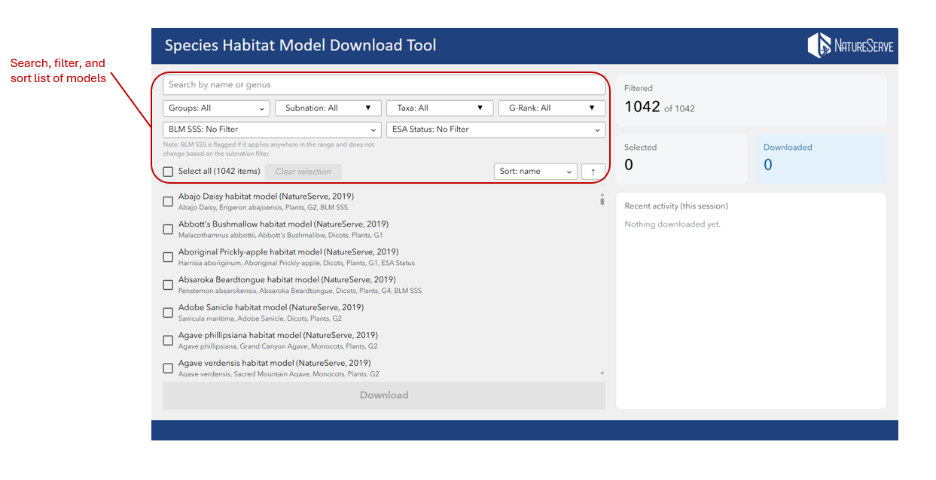
To search for models by name or genus, use the search box at the top of the application. To filter the list of models, use the dropdowns for Groups, Subnation, Taxa, G-Rank, BLM SSS, and ESA Status (Figure 1). The Groups dropdown refers to your access group and filters models to those accessible to BLM based on the agency’s data license with NatureServe. Note that BLM SSS is flagged at the model level if it applies anywhere in the range and does not change based on the subnation filter.
Figure 1
3. Download Species Habitat Models
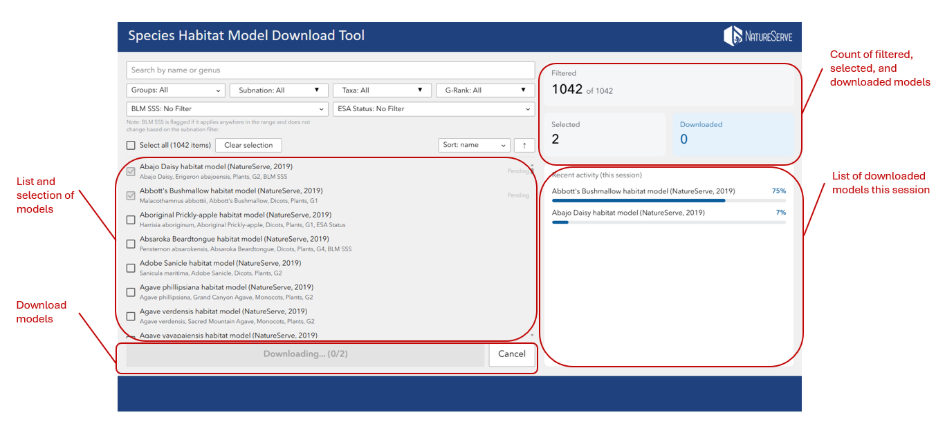
Select models from the models list and click the “Download” button. To track that you filtered, selected, and downloaded models, refer to the summary counts on the right-hand side of the application. Downloaded models will also be listed under “Recent Activity.” This will only show models downloaded for your current browser session (Figure 2). Models will be downloaded to your browser’s downloads folder.
Figure 2
Was this article helpful?
That’s Great!
Thank you for your feedback
Sorry! We couldn't be helpful
Thank you for your feedback
Feedback sent
We appreciate your effort and will try to fix the article